
Vectis

Vectis Run · the operating layer for hotel work

Every hotel task. Assigned, proven, verified.

Every routine, check and guest issue becomes a task with an owner, a due time, photo proof where it matters and a verification decision — so owners and GMs see exceptions, not noise.

  • In daily useat a working hotel since July 2026
  • Works alongside your PMSno rip-and-replace
  • Any phoneinstallable web app for staff

How it works

“Marked done” is not the same as “done right.”

A ticked box tells you someone pressed a button. Vectis keeps the whole chain — who owned the work, when it happened, what the photo showed, which standard it was checked against, and who decided.

  1. 01

    Assigned

    One owner, one due time, every task.

  2. 02

    Done

    Staff start and finish on their phone.

  3. 03

    Proven

    A photo where it matters.

  4. 04

    Verified

    By a manager, or AI against your standard.

  5. 05

    Visible

    Exceptions surface. Everything is on record.

Story · sample data

Here is one day of it. Sample Hotel, eighteen hours, read like a ledger. The clock and the counters follow you down the page.

05:30Entry 01 / 11Story · sample data

The day writes itself. Before anyone clocks in.

Event
Daily task generation
Generated
63 tasks across 6 departments
Source
Recurring templates · daily, weekly, monthly, quarterly, yearly
Each task
Owner · due time · SLA · proof rule
Front officeKitchenF&B serviceHousekeeping checksMaintenance roundsGM duties

In Vectis

Routines that run themselves.

Each department's routines live as recurring templates with a schedule, a due time and an SLA. Every morning the day's work is generated automatically — nobody re-types yesterday's checklist. Anything unplanned becomes a quick task in seconds.

Any department's routine can run this way: front office, kitchen, F&B service, housekeeping checks, maintenance rounds, accounts, GM duties.

06:30Entry 02 / 11Story · sample data

Kitchen opening checks. One name on it.

Task
Kitchen opening checks
Department
Kitchen
Owner
Arjun M.
Due
07:00
Status
In progress started 06:31

In Vectis

Clear ownership, by role.

Every task belongs to one person, and can be reassigned when shifts change. Access follows the role: Owner, GM, Department head, Supervisor, Staff — each sees what their job needs.

Sample data

My tasks

Arjun M. · Kitchen

Do this next

Kitchen opening checks

Due 7:00 AM · photo required

Take photo

Also needs you

Cold room temperature log

Due 8:00 AM

Upcoming

Staff work from My tasks on any phone — an installable web app, no app store. Do this next, Also needs you, Start, Take photo, Retake, Redo. Almost no typing.

07:18Entry 03 / 11Story · sample data

Check-in counter setup. Photo submitted.

Illustration: a tidy hotel check-in counter, submitted as photo proof Awaiting verification
Priya S. · Front office · 07:18Sample data
Due
07:30
Protocol
Check-in counter setup · version 3
Decision
Verified 07:26 · Neha K., Front office head

In Vectis

Proof, checked against your own standard.

Photo proof is required on the tasks that matter. Each one is checked against a verification protocol — the hotel's written standard, broken into criteria and versioned. A task keeps the exact version it was created under, so yesterday's decision is never judged by today's rules.

Sample data

Check-in counter setup

Verification protocol · v3 · 4 criteria

  • Counter clear of personal items
  • Registration cards stacked
  • Key card holder stocked
  • Welcome sign facing the entrance

Writing the standard is helped too: in Verification Studio, AI suggests checks for a standard, and a manager writes, edits and publishes them.

09:00Entry 04 / 11Story · sample data

Lobby & corridor cleaning. Overdue since 9:00 AM.

Task
Lobby & corridor cleaning
Owner
Rahul D. · Housekeeping
Due
09:00 · SLA passed
Status
Escalated on the supervisor's Overview
Resolved
09:41 · photo · verified

In Vectis

Exceptions, not noise.

When a task runs past its due time it is marked overdue, then escalated — a status the supervisor sees on the Overview, with Needs attention now at the top. The language stays plain: “Overdue since 9:00 AM”, never “you failed”.

Earlier unresolved work is shown separately as backlog. It is never quietly hidden.

Sample data

Overview · today

Sample Hotel · 09:05

Escalated or missed

1

Overdue (SLA)

1

Awaiting verification

3

In progress / pending

12

Needs attention now

Lobby & corridor cleaning

Rahul D. · Overdue since 9:00 AM

Escalated

Earlier unresolved

None from yesterday · shown separately when present

11:40Entry 05 / 11Story · sample data

Guest complaint: room AC. Owner assigned. Due in 30 minutes.

Complaint
Room 214 · AC not cooling
Logged by
Front office · 11:40
Owner
Arjun M. · Maintenance
Due
12:10 · 30-minute SLA
Status
Verified 12:06

In Vectis

A complaint is a task, too.

Guest complaints run through the same loop as everything else: an owner, a deadline, proof and a verification decision. Nothing lives in a chat thread that scrolls away.

Sample data

Room 214 · AC not cooling

  1. Complaint logged · front office
  2. Assigned to Arjun M. · due 12:10
  3. Started
  4. Photo submitted · filter cleaned
  5. Verified · Neha K.

14:10Entry 06 / 11Story · sample data

Completed on behalf. A signal is not a conclusion.

Task
Pool area check · assigned to Rahul D.
Marked done
14:10 · by Neha K., on his behalf
Signal
Completed on Behalf raised in the hourly run
Outcome
Reviewed · Rahul was at the AC call · noted

In Vectis

Operational Integrity.

Every hour, rule-based checks read the records themselves and raise signals when something looks unusual. A person reviews the context and decides. Most signals have an ordinary explanation — the point is that someone looked.

Completion BurstCompleted on BehalfUnusual Completion TimingUnusual Verification TimingAdministrative Override

17:00Entry 07 / 11Story · sample data

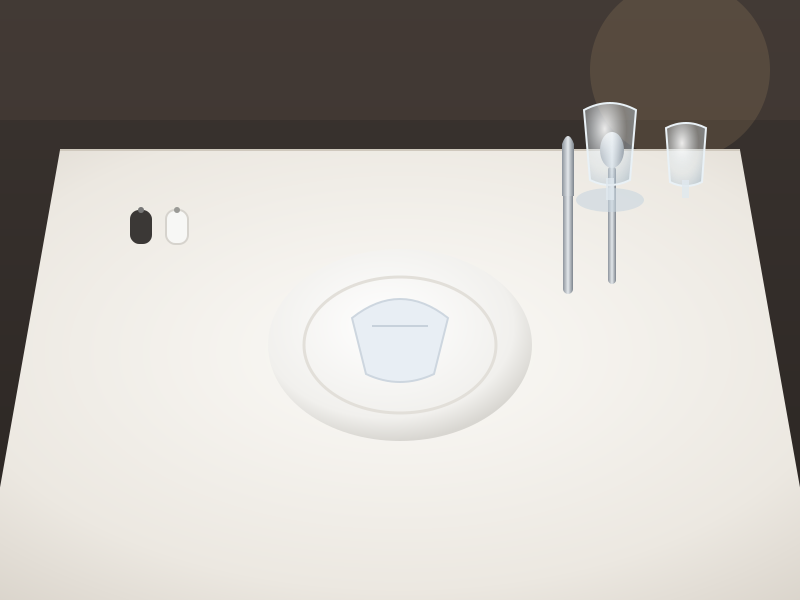
Restaurant setup for dinner. Fork missing.

Illustration: a restaurant table setting with the fork missing on the left of the plate Work failure
F&B service · 17:00Sample data
Sample data

3 · AI assessment

  • Plate centred on the settingPass
  • Glassware upright and cleanPass
  • Cutlery aligned both sidesFork absent
  • Napkin foldedPass

Result: Work failure · Sent to a person

Request retakeRequest reworkVerify

17:06 · Neha K. requested rework. Recorded as a human decision, separate from AI.

In Vectis

AI checks the photo against your standard.

Criterion by criterion, with its reasoning shown to the reviewer. Every result lands in one of four outcomes:

Pass

Meets the standard. Ready to verify.

Work failure

The work is wrong. Goes back for rework.

Evidence inadequate

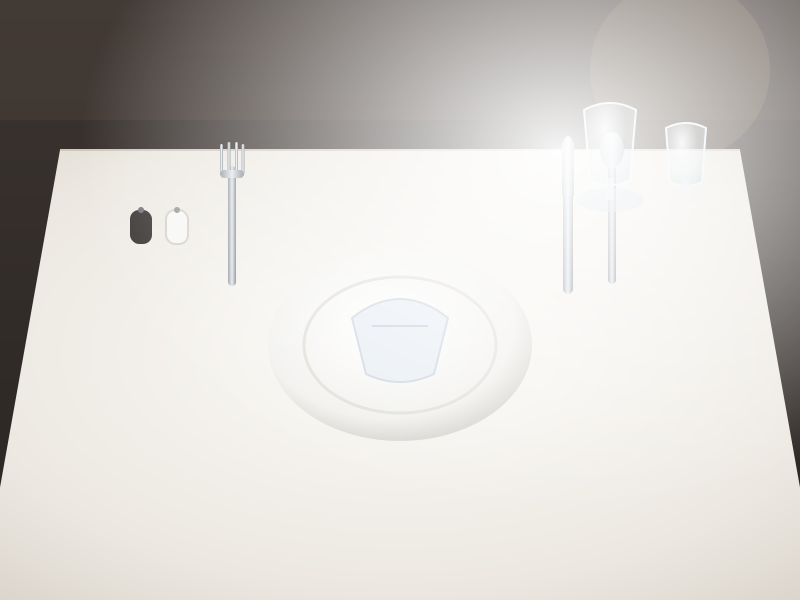
The photo can't prove it. A new photo is needed.

Uncertain

Always goes to a person. Never automated.

You decide what AI may decide.

  • Protocol by protocol, the owner chooses: AI applies the result on its own, or recommends to a manager.
  • Anything not authorised waits for a person. Uncertain can never be automated.
  • One-click stop switches, and a random audit of automatic approvals.
  • “AI got this wrong” corrections are recorded and measured on the AI Quality page — results, corrections, disagreements, provider cost and speed.

17:24Entry 08 / 11Story · sample data

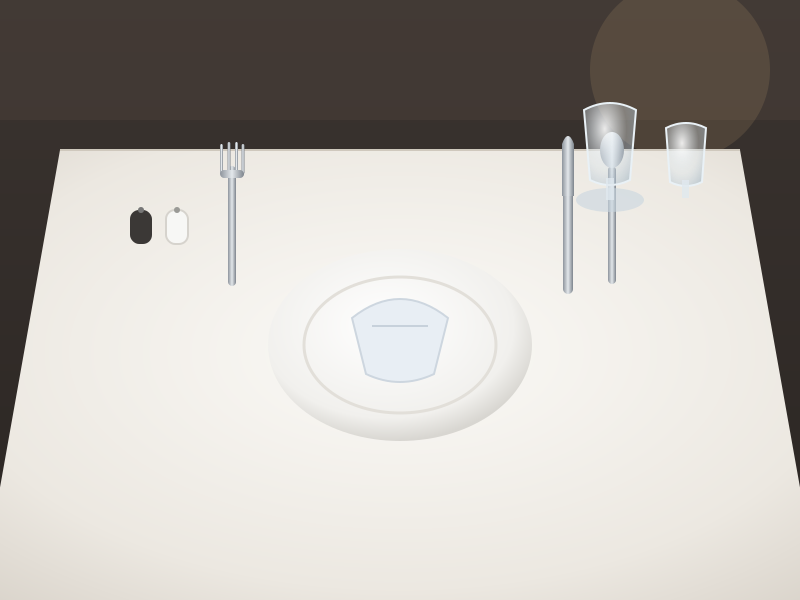
Redone. Resubmitted. Pass.

Illustration: the same restaurant table setting, now complete with the fork in place Pass
Resubmitted 17:24 · rework 1 · retake 0Sample data
Sample data

4 · History

  1. Photo submitted · protocol v2
  2. AI assessment · Work failure
  3. Rework requested · Neha K.
  4. Started again · Rahul D.
  5. Photo resubmitted
  6. AI assessment · Pass
  7. Verified · Neha K.

In Vectis

Retake is not rework.

Rework means the work was wrong. Retake means the photo can't prove it — “this is about the photo, not the work.” Vectis counts them separately, so a blurry photo never reads as bad work.

Illustration: a blurred, overexposed photo of a table setting that cannot prove the standard was met Evidence inadequate
Example · → Request retakeSample data

Everything on the record.

Every state change is timestamped and logged in an append-only audit trail. Every AI result keeps its photo, protocol version, model and reasoning.

21:00Entry 09 / 11Story · sample data

Guest feedback: dining. Heard while it's fresh.

Form
Dining feedback
Collected
21:00 · staff phone handed to the guest
Rating
4 of 5
Visible to
F&B head · GM · Owner

In Vectis

Guest feedback, next to the work.

Feedback forms for stays, dining and events. Staff open the form on their phone and hand the device to the guest; a photo can be taken on the spot. Ratings are visible to managers alongside the day's operating record.

Sample data

Dining feedback

Sample Hotel · Restaurant · Table 6

Overall

4 of 5

Comment

“Lovely food and a calm room. Dessert took a while.”

Photo

Optional · taken on the spot

23:30Entry 10 / 11Story · sample data

Day closed. Every line accounted for.

63

Tasks

61

Done

24

Verified

4

Exceptions

2 not done → carried into tomorrow as earlier unresolved backlog, shown separately. Exceptions: 1 escalation, 1 complaint, 1 integrity signal, 1 rework — each with its own record.

In Vectis

Reports that close the day.

The Daily Operations Report breaks the day down by property, department and person — print it, save it as PDF or export CSV. Owners and GMs also get an in-app daily briefing.

Running more than one hotel?

Built for groups from day one: switch between properties, with every record and every role scoped to its property.

Sample HotelThe Meridian House (sample)
Sample data

Daily Operations Report

Sample Hotel · by department

DepartmentDoneVerifiedExc.
Front office14/1461
Kitchen12/1240
F&B service11/1261
Housekeeping13/1451
Maintenance7/721
GM duties4/410
Total61/63244

Print · PDF · CSV

08:00Next morning · Entry 11 / 11Story · sample data

The owner's report arrives. On WhatsApp.

In Vectis

Yesterday, in one PDF.

Every morning at a set time, a PDF of the previous day's operations is delivered to owners and managers on WhatsApp — a daily report, not a stream of pings. It has been running every day at a working hotel since September 2026.

The owner reads the exceptions over coffee. The detail is one tap away, in the report and in the app.

Sample data · WhatsApp

PDF

Daily Operations Report — Sample Hotel

4 pages · PDF

Good morning. Yesterday at Sample Hotel: 61 of 63 tasks done, 24 verified, 4 exceptions.

08:00

The day, as a list

What Vectis Run does.

Skipped the story? Here is all of it. Vectis Run is the operating layer for a hotel's daily work — in daily use at a working hotel since July 2026.

  • 01

    Routines that run themselves

    Recurring templates per department — daily to yearly, with due times and SLAs — plus quick tasks.

  • 02

    Clear ownership

    Every task assigned to a person. Roles: Owner, GM, Department head, Supervisor, Staff.

  • 03

    Staff phone experience

    An installable web app on any phone. Do this next, Take photo, Retake, Redo. Needs a connection.

  • 04

    Photo proof & protocols

    Your written standard as versioned criteria. Each task keeps the version it was created under.

  • 05

    Verify, rework or retake

    Three human decisions. Rework (the work) and retake (the photo) are tracked separately.

  • 06

    AI photo checks

    Criterion by criterion: Pass, Work failure, Evidence inadequate, Uncertain. Reasoning shown.

  • 07

    Owner-granted AI authority

    Per protocol, decide or recommend. Uncertain always goes to a person. Stop switches, audits, AI Quality page.

  • 08

    Exceptions overview

    Escalated or missed, overdue, awaiting verification, in progress. Earlier backlog shown, never hidden.

  • 09

    Operational Integrity

    Hourly, rule-based signals on the records. A signal is not a conclusion.

  • 10

    Reports & WhatsApp morning PDF

    Daily Operations Report by property, department and person. Print, PDF, CSV, plus a daily briefing.

  • 11

    Guest complaints & feedback

    Complaints tracked as tasks with an owner and deadline. Feedback forms handed to guests on a staff phone.

  • 12

    Groups & your PMS

    Switch between properties, roles per property. Works alongside your PMS — no rip-and-replace.

Why it's different

Not a checklist. A governed loop.

Plenty of tools can tick a box, and several now put AI on a photo. What matters is what happens around the decision — who is allowed to make it, what happens when it is unsure, and whether a wrong call is caught.

A checklist recordsVectis records
That a box was tickedWho owned it, when, and the photo that proves it
Pass or failFour outcomes — and Uncertain always goes to a person
“Redo”Rework (the work) and retake (the photo), counted apart
Whatever the AI saidWhat the owner allowed AI to decide, protocol by protocol
The final stateEvery change, append-only — including corrected AI calls
Nothing unusualIntegrity signals for a person to review

Where it runs today

Real days, not a demo script.

We would rather show you less and have all of it be true. Numbers below wait for approval before publication.

Pending approval for publication
  • In daily use at a working hotel since July 2026
  • 50+ recurring routines across 6 departments
  • Thousands of tasks per month
  • A WhatsApp morning report every day
Placeholder — pending verification

Case study · Galaxy

4.5 → 4.9

Galaxy's reported average guest rating rose from 4.5 to 4.9 following its Vectis rollout.

Reported figure. Platform, periods and review counts not yet verified.

Vectis products

Run the day. Then grow from it.

Vectis Run

Live · in daily use

The operating layer for a hotel's daily work. Assigned, done, proven, verified, visible.

  • Routines, ownership and staff phone app
  • Photo proof, protocols and AI checks under owner control
  • Exceptions overview and Operational Integrity
  • Reports and the WhatsApp morning PDF

Vectis Grow

Coming next · roadmap

Turning that operating truth into better guest outcomes and revenue. Not available yet; no dates announced.

  • Guest feedback intelligence
  • Enquiry and banquet capture
  • Owner intelligence
  • Revenue insight

Questions

Asked by owners and GMs.

Does Vectis replace our PMS?

No. Vectis Run works alongside your PMS — it runs the operational work around your rooms and guests. There is no rip-and-replace.

Does the AI make decisions on its own?

Only where you allow it. Protocol by protocol, the owner chooses whether AI applies its result automatically or recommends to a manager. Anything not authorised waits for a person, Uncertain always goes to a person, and stop switches turn automation off in one click. Corrections are recorded on the AI Quality page.

What happens when a photo is blurry?

That is a retake, not a rework. The reviewer — or the AI, as Evidence inadequate — asks for a new photo. It is counted separately from rework, so a bad photo is not recorded as bad work.

Do staff need to download an app?

No app store. Vectis Run is an installable web app that works on any phone. It needs a connection to save work.

Is Operational Integrity about watching staff?

It reads the task records — timings, who completed what, overrides — and raises signals for a manager to review. A signal is not a conclusion; most have an ordinary explanation.

Which departments can use it?

Any department with a routine: front office, kitchen, F&B service, housekeeping checks, maintenance rounds, accounts and GM duties.

We run more than one hotel. Does that work?

Yes. Vectis is built for groups from day one: switch between properties, with records and roles scoped to each property.

What is Vectis Grow?

The next product on our roadmap — guest feedback intelligence, enquiry and banquet capture, owner intelligence and revenue insight. It is not available yet.

Book a demo

See your own day, accounted for.

We will walk through Vectis Run using routines like yours — from the first generated task to the morning report.

Request a demo

Prototype — not connected