Vectis Run · Hotel operations
Marked done is not the same as done right.
Vectis Run turns every hotel routine into a task with an owner, a deadline, photo proof and a verified result — checked by your managers or by AI against your own standards.
01The gap
A tick tells you someone tapped a box. Not that the work is right.
Hotels already run on routines. What goes missing is the evidence — who did it, when, against which standard, and whether anyone checked.
“Done.”
A tick, a thumbs-up, a message at the end of the shift. No time, no proof, and nobody can say later what “done” meant.
“Done, with a photo.”
Better. But a photo nobody reviews is still a promise. And when it fails, nothing says whether the work was wrong or just the picture.
“Verified.”
- 1An owner and a due time for every task
- 2Photo proof where it matters
- 3Checked against your written standard
- 4A recorded decision, and who made it
- 5Exceptions surfaced, not buried
02The loop
Every task travels the same five steps.
From assignment to a verified result — with two ways back when something isn’t right, and a person whenever the answer isn’t clear.
- 01AssignedEvery routine, check and guest issue becomes a task with one owner and a due time. Recurring routines appear on their own each day.
- 02StartedStaff open My tasks on their phone and see Do this next. Starting is one tap.
- 03DoneMarked done — the point where most systems stop counting.
- 04ProofA photo on the tasks that matter, attached to the task itself. Minimal typing.
- 05VerifiedChecked against your written standard, criterion by criterion — by a manager, or by AI.
03A day in a hotel
A hundred and twenty tasks. Seven that need you.
Each square is one task — six departments, hour by hour, from 6 AM. As the day moves, work resolves quietly. What is late or waiting for review rises to the top.
- Still to come
- In progress
- Done, no review needed
- Verified
- Awaiting review
- Overdue
Exceptions, not noise.
Owners and GMs see the few things that need them — never the hundred that went fine.
Overdue3
- Pool plant room roundMaintenance · Overdue since 3:00 PM
- Buffet ready checkF&B service · Overdue since 8:00 PM
- Corridor round, third floorHousekeeping · Overdue since 9:00 PM
Awaiting review4
- Lobby evening checkFront office · Photo submitted 6:10 PM
- Dinner table settingF&B service · Photo submitted 7:02 PM
- + 2 moreKitchen · Front office
04Decision anatomy
AI checks the photo. You decide what it may decide.
AI reads each proof photo against your written standard, criterion by criterion, and returns one of four outcomes. Its reasoning and per-criterion results are shown to the reviewer. Whether it acts on its own is your call — protocol by protocol.
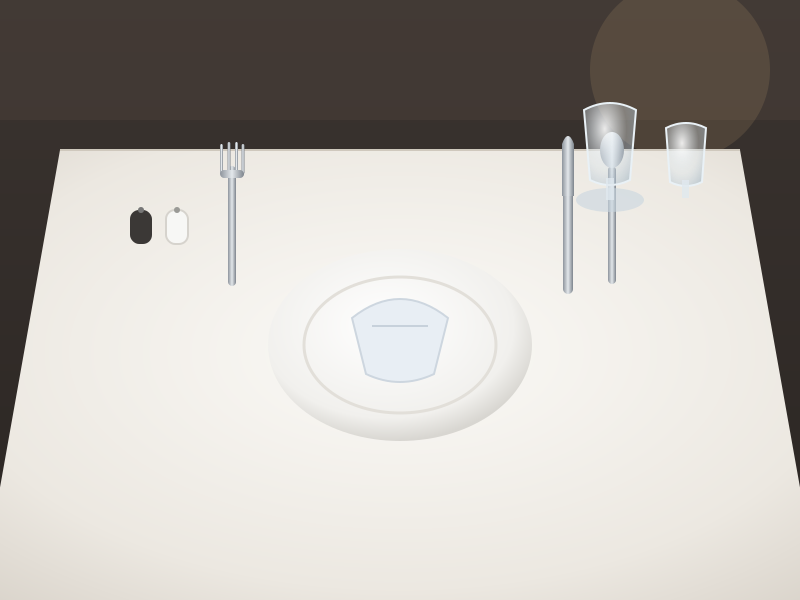
Pass
Every criterion in the standard is met.
TriggersThe task is verified.
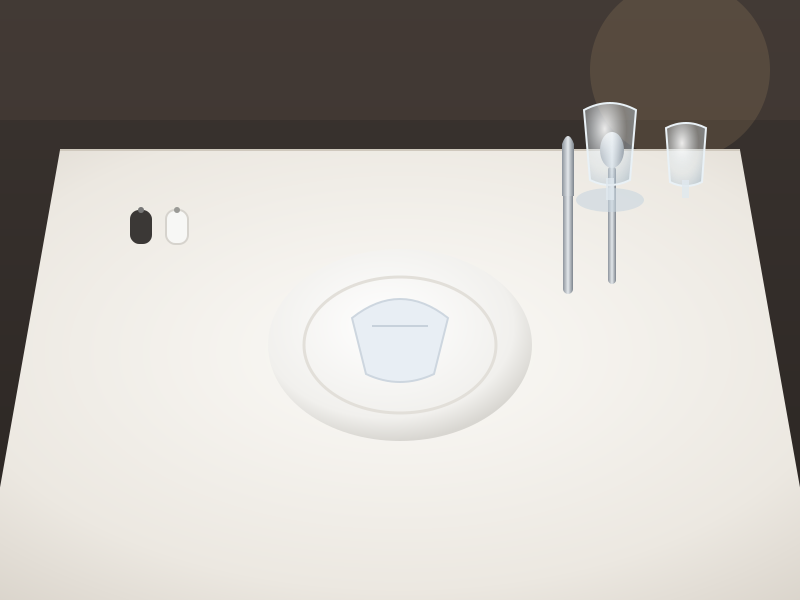
Work failure
The photo shows the work itself is wrong — a fork is missing.
TriggersRework. Back to the same person to redo.Counted as rework.

Evidence inadequate
The photo can’t prove it either way — blurred, dark or cropped.
TriggersRetake. A new photo is requested.About the photo, not the work. Counted separately.
Uncertain
The AI can’t tell. It says so instead of guessing.
TriggersA person reviews the proof and decides.
Nothing is applied automatically. Every result is sent to a person.
Off until you say so
An owner authorises automatic decisions for a specific protocol. Anything not authorised waits for a person.One-click stop
Stop switches turn automatic decisions off at once. Everything returns to a person.Random audits
A random sample of automatic approvals goes back to a person to check.Corrections that count
“AI got this wrong” is recorded as a new human decision and measured on the AI Quality page — with disagreements, cost and speed.05Operational Integrity
Signals, not accusations.
Every hour, simple rules look at the records themselves and raise signals where the pattern looks unusual. A manager looks. Nothing is scored, ranked or concluded on its own.
- 01
Completion Burst
Many tasks closed within a few minutes of each other.
- 02
Completed on Behalf
A task closed by someone other than the person it was assigned to.
- 03
Unusual Completion Timing
Work marked done at a time that doesn’t fit the task.
- 04
Unusual Verification Timing
A review made at a time that doesn’t fit the pattern.
- 05
Administrative Override
A record changed by an administrator outside the normal flow.
A signal is not a conclusion.
There are often good reasons — a supervisor covering a shift, a late delivery. Signals exist so the question gets asked, calmly, with the record in front of you.
06Roles
Everyone sees their part. Nobody sees noise.
Role-based access, assigned per property. Each role gets exactly what it needs to act.
| Role | Sees | Does | Gets |
|---|---|---|---|
| OwnerAcross properties | Exceptions: what was missed, what is late, what is waiting, where records look unusual. | Decides what AI may decide, protocol by protocol. Can stop it in one click. | The WhatsApp morning report and the AI Quality page. |
| GMRuns the property | Overview — needs attention now, overdue, awaiting verification, in progress. | Sets routines and standards, reviews proof, reassigns work. | A daily briefing and the Daily Operations Report. |
| Department headOwns a department | Their department’s routines, owners and exceptions. | Verifies, requests rework or requests a retake. | Their department in the daily report, by person. |
| SupervisorOn the floor | The shift’s tasks and who owns each one. | Verifies on the spot, follows up overdue work, reassigns. | A clear queue of what is awaiting review. |
| StaffOn their phone | My tasks: Do this next, and Also needs you. | Start, Take photo, Retake, Redo. Minimal typing. | A fair record — a retake is about the photo, not their work. |
07Visibility
Yesterday, closed out before breakfast.
Owners and managers start the day knowing what happened — without asking anyone.
- At a set time
WhatsApp morning report
A PDF of yesterday’s operations, sent to owners and managers on WhatsApp.
Live at a hotel since September 2026 - In the app
Daily briefing
A daily briefing for owners and GMs, alongside the Overview of what needs attention now. - Any time
Daily Operations Report
By property, department and person. Print it, save a PDF or export CSV. - Always
Audit trail
Every state change timestamped and logged, append-only. Every AI result keeps its photo, protocol version, model and reasoning.
08Departments
Any routine, in any department.
Recurring routines — daily, weekly, monthly, quarterly or yearly — with due times and SLAs, plus quick tasks whenever something comes up.
- 01
Front office
Lobby ready by 7:00 AM · Shift handover · Arrival checks
- 02
F&B service
Dinner table setting to standard · Buffet ready check
- 03
Kitchen
Cold-room temperature log · Closing clean-down
- 04
Housekeeping checks
Public area round · Linen room check
- 05
Maintenance rounds
Pool plant room round · Generator check
- 06
Accounts
Daily cash-up · Night audit pack
- 07
GM duties
Morning walk-through · Weekly standards review
- 08
Guest complaints
Complaints tracked as tasks with an owner and a deadline
Example routines · sample dataGuest feedback forms for stays, dining and events — staff open the form on their phone and hand it to the guest, with a photo taken on the spot if needed.
09Multi-property
Built for groups from day one.
Each property keeps its own routines, people and records. You keep one way of working — and one sign-in to move between them.
10Products
Run the hotel. Then grow it.
Vectis Run creates a reliable record of how the hotel actually operates. Vectis Grow, coming next, will turn that operating truth into better guest outcomes and revenue.
Vectis Run
AvailableThe operating layer for daily work.
- Routines and quick tasksOwners, due times, SLAs
- Photo proofWhere it matters
- VerificationManagers or AI, your standard
- Operational IntegrityHourly signals
- ReportsDaily, WhatsApp, CSV
- Guest complaintsTracked as tasks
- Guest feedback formsOn a handed device
Vectis Grow
Coming next · roadmapNot available yet. What we are building towards:
- Guest feedback intelligence
- Enquiry and banquet capture
- Owner intelligence
- Revenue insight
11So far
Built inside a working hotel. Not in a slide deck.
- Proof, not promises.Done means there is evidence, and someone checked it.
- Exceptions, not noise.The few things that need a decision, at the top.
- Standards, written down.Criteria your team can see, versioned over time. In Verification Studio, AI can suggest checks; a manager writes, edits and publishes them.
- Authority, granted.AI acts on its own only where an owner says so.
In daily use at a working hotel since.
A WhatsApp morning report to owners and managers.
Recurring routines at the first hotel.
Pending approval for publicationDepartments running their routines on Vectis Run.
Pending approval for publicationTasks a month, each with an owner and a record.
Pending approval for publicationGalaxy’s reported average guest rating rose from 4.5 to 4.9 following its Vectis rollout.
No invented statistics. Figures marked pending are aggregate operating facts awaiting approval; the guest-rating figure is founder-reported and not yet verified.
12Book a demo
See your own routines in Vectis Run.
A short walk-through, built around one of your real routines and your own written standard.
- 01Pick one routine you care about
- 02Write its standard as criteria
- 03Watch it travel the loop, end to end
13Questions
Plain answers.
Do we need to replace our PMS?
No. Vectis Run works alongside your PMS — no rip-and-replace. It runs the routines, checks and guest issues around it.
Do staff need to download an app?
No app store. Vectis Run works on any phone in the browser and can be installed to the home screen. It needs a connection to work.
Does the AI decide on its own from day one?
No. AI checks recommend to a manager unless an owner authorises automatic decisions for a specific protocol. Uncertain results always go to a person, and automatic decisions can be stopped in one click.
What happens when the AI gets it wrong?
A manager marks “AI got this wrong”. The correction is recorded as a new human decision and shows up on the AI Quality page, alongside disagreements, provider cost and speed.
Is Operational Integrity a staff-scoring tool?
No. It raises signals on the records themselves — no scores, no leaderboards. A signal is not a conclusion; it is a reason to look.
Can we run more than one property?
Yes. Vectis Run is built for groups from day one: every record belongs to its property, roles are assigned per property, and you switch between properties with one sign-in.
What is Vectis Grow?
Our next product, on the roadmap and not available yet: guest feedback intelligence, enquiry and banquet capture, owner intelligence and revenue insight, built on the operating record Vectis Run creates.