Vectis RunThe operating layer for a hotel's daily workThe operating layer for hotels

Hotel operations you can actually verify.

Every routine, check and guest issue becomes a task with an owner, a due time and photo proof — then a verification decision, by a manager or by AI checking against your own written standard.

  • In daily use at a working hotel since July 2026
  • Works on any phone — no app store
  • Works alongside your PMS

Sample data Real Vectis Run screens, recreated with a fictional property.

The gap

“Marked done” is not the same as “done right.”

  • A tick on paper, a message in a group

    Someone says it's done. Nobody can see whether it was done to standard — or done at all.

  • The standard lives in people's heads

    What “set correctly” means changes with the shift, the supervisor and the day.

  • Misses surface when a guest finds them

    By the time a skipped check is noticed, it is a complaint rather than a task.

Marked done

Dinner table setting — done

No photo. No standard. No one checked.

Done right, in Vectis Run Sample data

Dinner table setting

Verified
  1. 17:30Assigned to Neha K. · due 19:00
  2. 18:52Completed with 1 photo · on time
  3. 18:53AI assessment · Pass, 5 of 5 criteria
  4. 19:04Verified by Rahul D. · standard v3

How it works

Assigned → Done → Proven → Verified

One loop for every routine, check and guest issue. Each step is timestamped, so the record speaks for itself.

  1. 1Step 1

    Assigned

    Routines generate themselves each day — daily, weekly, monthly or longer — with an owner, a due time and an SLA. Quick tasks too.

  2. 2Step 2

    Done

    Staff open My tasks on their phone, start the task and finish it where the work happens.

  3. 3Step 3

    Proven

    Tasks that matter need a photo. The proof stays attached to the task, with the time and the person.

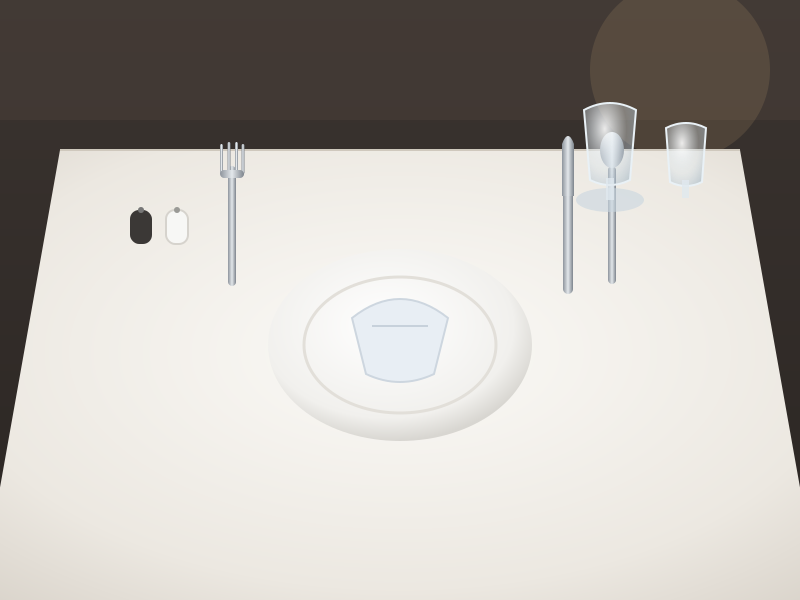
    Sample proof photo: a restaurant table set with plate, cutlery and glasses
    1 photo · 18:52 · Neha K.Awaiting verification
  4. 4Step 4

    Verified

    A manager — or AI, where you allow it — checks the proof against your written standard.

…and visible.

Every state change is timestamped and logged, append-only. It all rolls up to the people who need it.

OverviewOperational IntegrityDaily operations reportWhatsApp morning report

For staff

One screen. What to do next.

My tasks answers two questions: what needs my attention, and what do I do next. No dashboards, no helper paragraphs, minimal typing.

  • Do this next

    Exactly one task — the most urgent — with one clear button.

  • Also needs you

    Retakes and rework, each with its own action, so nothing sent back gets lost.

  • Start, take photo, redo

    The camera appears only where a photo is needed. Proof takes seconds.

  • Works on any phone

    Opens in the browser and installs to the home screen. No app store, no new device.

Retake

About the photo, not the work. The proof couldn't show the standard — take a new photo.

Rework

The work needs redoing. Tracked separately from retakes, so you can see which is which.

Manager review and AI verification

AI checks the photo against your standard. A person stays in charge.

Write the standard once as a verification protocol — your criteria, versioned. AI reviews each proof photo criterion by criterion and shows its reasoning to the reviewer. You decide, protocol by protocol, whether it decides on its own or recommends to a manager.

  • Pass

    Ready to verify. Every criterion is visible and met.

  • Work failure

    Rework. The photo shows a criterion not met.

  • Evidence inadequate

    New photo. The photo can't prove it — not a work failure.

  • Uncertain

    Always goes to a person. The AI doesn't guess.

Every AI result keeps its photo, protocol version, model and reasoning. Each task keeps the exact protocol version it was created under. In Verification Studio, AI can suggest checks for a standard — a manager writes, edits and publishes them.

Try three sample submissions

Interactive demo · sample data
Verification · F&B service Sample data

Dinner table setting — restaurant

1Work
Owner
Neha K.
Due
19:00
Submitted
18:52 · on time
Standard
Dinner table setting v3
2Evidence
Sample proof photo: dinner table set correctly
1 photo · 10 Oct 18:52 · Neha K.
    3AI assessment · advisory
    PassAttempt #1 · Dinner table setting v3

    What happens next: Verified

    For owners

    You decide what the AI may decide.

    Nothing is automatic by default — every AI result waits for a person. An owner can authorise automatic decisions per protocol, for the outcomes they choose. Uncertain results can never be automated, and one click stops everything.

    Protocol by protocol

    Authority is granted for one protocol version and one AI model. A new version needs a new authorisation.

    One-click stop

    Stop one decision, one protocol or everything at a property. It takes effect immediately.

    Random audits

    Draw automatic approvals at random and check them, so nothing approves itself unseen.

    Corrections are measured

    “AI got this wrong” is recorded as a new human decision and counted on the AI Quality page.

    Configure · Automatic AI decisionsSample data
    Review · AI QualitySample data

    Owner visibility and reporting

    See exceptions, not noise.

    Overview shows what's missed, late, waiting for review and in progress — with earlier unresolved work shown separately, never hidden. Operational Integrity flags records that look unusual. And yesterday's report is on your phone every morning.

    Operational Integrity Sample data
    Overview · earlier unresolved Sample data
    Daily operations report Sample data
    WhatsApp morning report

    Departments and properties

    Any department's routine. Any of your properties.

    If it happens every day, week or month, it can run as a task with an owner, a due time and proof where it matters. Examples below are illustrative.

    Front office

    • Check-in counter setup
    • Arrivals list prepared
    • Shift handover log

    F&B service

    • Dinner table setting
    • Breakfast buffet readiness
    • Bar mise en place

    Kitchen

    • Fridge temperature log
    • Opening and closing checks
    • Stores receiving check

    Housekeeping checks

    • Lobby and washroom checks
    • Public area rounds
    • Linen store count

    Maintenance rounds

    • Generator log reading
    • Pool water check
    • Meter readings

    Accounts

    • Cash float count
    • Voucher filing
    • Card batch settlement

    GM duties

    • Daily property walkthrough
    • Department head check-ins
    • Morning briefing

    Guest issues too

    Complaints are tracked as tasks with an owner and a deadline. Staff can hand their phone to a guest for a feedback form, with a photo taken on the spot.

    Built for groups from day one.

    Switch between properties from the sidebar. Every record belongs to a property, and roles are set per property.

    • Owner, GM, Department head, Supervisor, Staff
    • Each person sees what their role allows
    • Automatic AI decisions are set per property

    In use

    Built inside a working hotel.

    Vectis Run has been in daily use at a working hotel since July 2026 — its routines, its staff, its mornings. Figures marked below are pending approval for publication.

    Since July 2026In daily use at a working hotel
    50+Recurring routines across 6 departmentsPending approval for publication
    ThousandsOf tasks through the loop each monthPending approval for publication
    Every morningA WhatsApp report of yesterday's operations
    Placeholder — pending verification

    Galaxy's reported average guest rating rose from 4.5 to 4.9 following its Vectis rollout.

    Not verified. Platform, periods and review counts to be confirmed before publication.

    Products

    Vectis Run today. Vectis Grow next.

    Run makes the daily work true and visible. Grow will turn that operating truth into better guest outcomes and revenue.

    VVectis RunAvailable now

    The operating layer for your hotel's daily work.

    • Recurring routines and quick tasks, with owners and due times
    • Staff My tasks on any phone, with photo proof
    • Verification protocols, manager review and AI photo checks
    • Owner-controlled automatic AI decisions and AI Quality
    • Overview, Operational Integrity, reports and WhatsApp morning report
    • Complaints tracked as tasks; guest feedback forms on a handed phone
    VVectis GrowComing next

    Turning operating truth into better guest outcomes and revenue.

    • Guest feedback intelligence
    • Enquiry and banquet capture
    • Owner intelligence
    • Revenue insight

    On the roadmap — not available yet. Intended capabilities, subject to change.

    Questions

    Straight answers.

    Does it replace my PMS?

    No. Vectis Run works alongside your PMS — there's no rip-and-replace. Your PMS runs reservations and billing; Vectis Run runs the daily work around them: routines, checks, guest issues, proof and verification.

    Do staff need to install anything?

    No app store. Vectis Run opens in the phone's browser and can be installed to the home screen as a web app. It works on any phone and needs a data connection to sync tasks and photos.

    Does the AI decide on its own?

    Only where you allow it. By default every AI result is a recommendation that waits for a person. An owner can authorise automatic decisions protocol by protocol, for the outcomes they choose, and stop them in one click. Automatic approvals can be audited at random, and every correction is recorded.

    What happens when the AI is unsure?

    It says so. An Uncertain result always goes to a person — that can never be automated. If the photo itself can't prove the work, the result is Evidence inadequate and the staff member is asked for a new photo, which is tracked separately from rework.

    Can we use it across properties?

    Yes. Vectis Run is built for groups from day one: switch between properties, with every record scoped to its property and roles set per property.

    Book a demo

    See Vectis Run on routines like yours.

    Tell us about your hotel. We'll walk you through the loop — from a routine on a staff phone to a verified record on your Overview.

    • Your departments and routines as tasks and protocols
    • Manager review and AI verification, with you in control
    • What owners see each morning

    Request a demo

    Prototype — not connected

    Nothing you type here is sent or stored.